
AI agents, ready to go in 48 hours
- triagen is your locally installed AI agent platform
- Agents take over your routine tasks across all departments
- No programming required: you configure instead of coding
Your team saves up to 94% of the time spent on routine tasks
Log enquiries in 5 minutes, create quotes in 30 minutes
Handling enquiries
saved
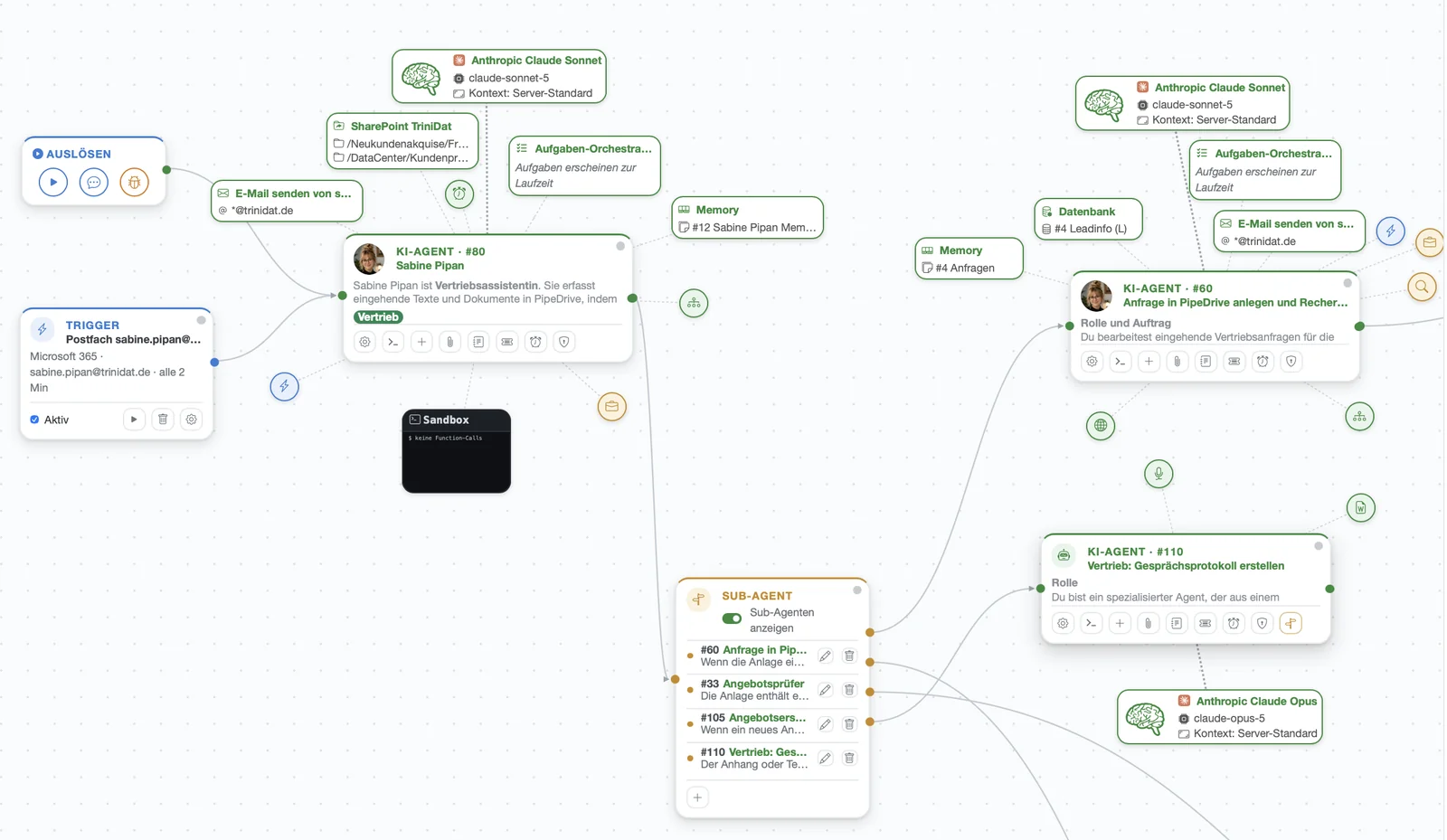
An enquiry comes in. The sales assistant researches the sender online and logs the enquiry in the CRM. She then checks the sales manager's diary, finds free slots, blocks them and writes a reply that addresses the subject of the enquiry.
Several agents log the enquiry in the CRM, research in parallel and find free slots on their own. Everything is summarised in one email, assessed and supplemented with a suitable draft reply. The sales assistant reviews the reply and sends it.

Employee review meeting
saved
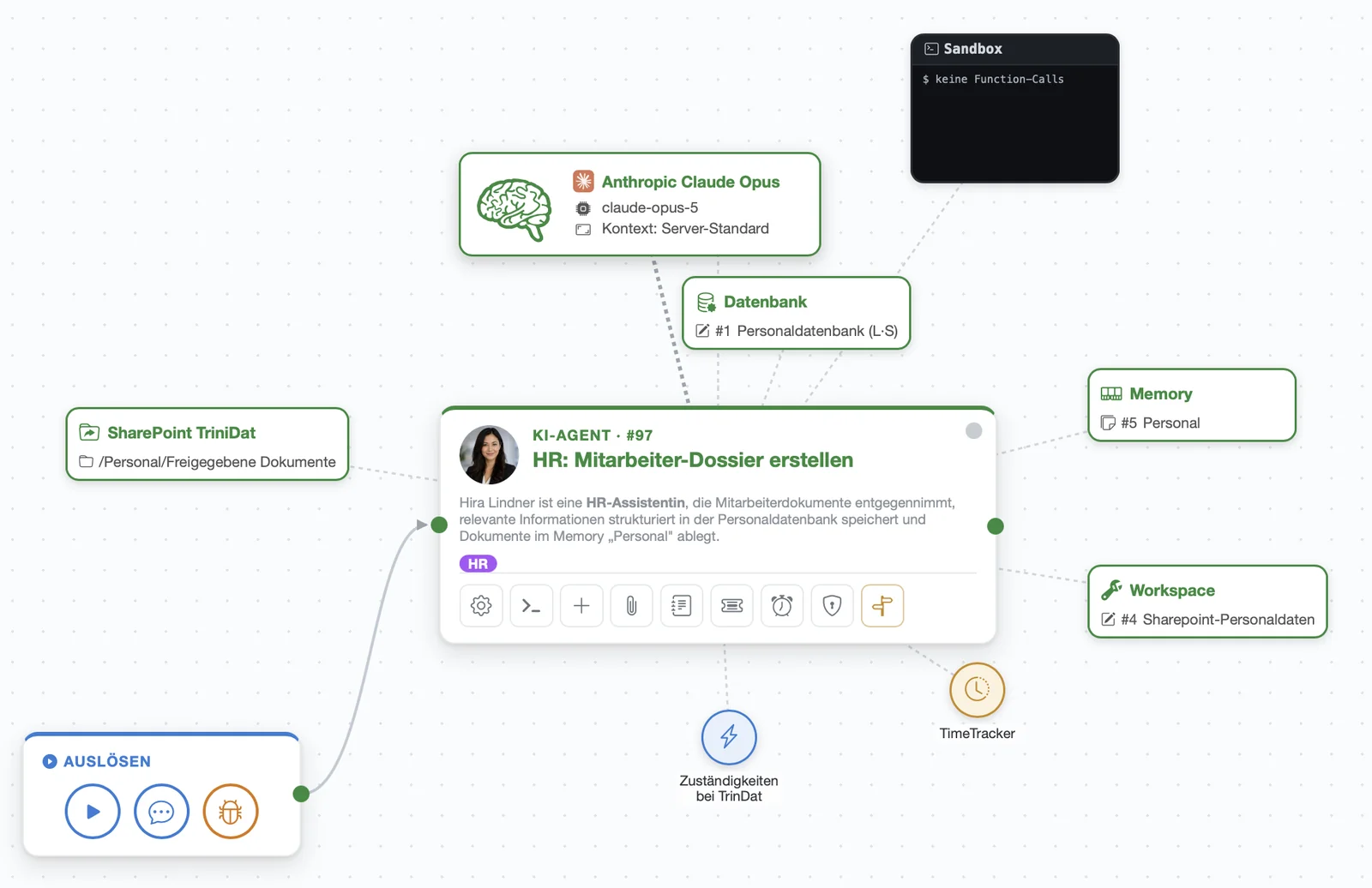
An employee asks for a review meeting. The line manager and the HR department gather all the information from various sources, such as salary, last salary change, working hours and holidays.
An agent compiles an employee dossier with all the facts relevant to the meeting. To do so, it accesses SharePoint, the employee database, Excel spreadsheets, time tracking and the holiday planner and links the data. It assesses the facts and delivers an ideal briefing. The line manager reviews the dossier and uses it to plan the meeting.

Creating quotes
saved
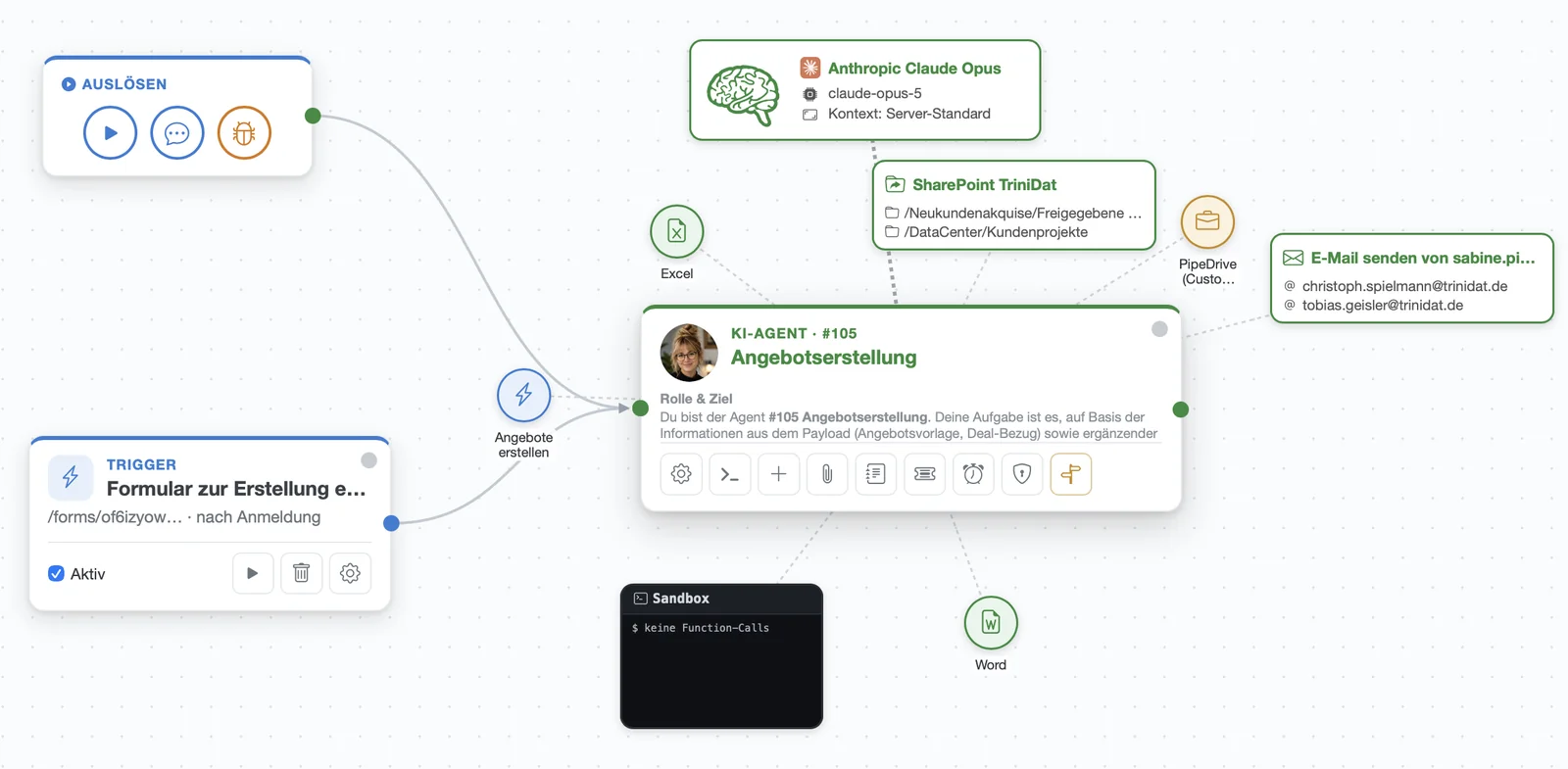
A customer needs an individual quote. A similar quote is dug out, copied and saved in the right folder on the NAS. Then the address is entered and the text adapted. Finally, the quote is checked, approved, converted to PDF and a cover email is written for sending it.
The sales representative asks the agent by email to create a quote and briefly describes it. The agent picks the right template, retrieves the address, contact person and meeting notes from the CRM, creates the individual quote and submits it for review together with a draft cover email. Once approved, the agent creates a PDF and sends the quote.

Why triagen is the perfect AI agent platform for SMEs
Full control over providers & costs
- Switch providers at any time, no lock-in
- You pay only your pure AI costs, no mark-ups
- Starting from €100 per month
Secure & trustworthy
- The Gatekeeper blocks confidential content, the critic checks every result
- Every run is logged
- Developed by trinidat in Düsseldorf, digitalisation partner to SMEs for 30 years
Ready to use quickly
- Docks directly onto your existing IT landscape, with over 5,000 connectors based on the open MCP standard; we develop any missing ones for you
- Implementation, building and use of the agents without any internal or external IT
How the AI agents work for you
Take the next step in the evolution of digitalisation and put smart AI agents to work on tedious routine tasks. triagen goes far beyond simple AI chatbots.
triagen agents are given a task, choose the right way to get there on their own and complete it reliably. Whether it's handling emails, writing reports or maintaining data in your CRM: the agents actively access the systems you have released to them and close out processes on their own. Best of all, you describe the task for the agent in plain language - no programming skills required! triagen runs on your own infrastructure, and confidential content is automatically masked before every request to a cloud model. You always keep full control over your data.
Trigger
Every run starts with a trigger. This is an event from your day-to-day business that you assign to the agent. When it occurs, the agent starts.
ExampleYou forward a customer's enquiry by email to your digital assistant, and she takes over.
The agent receives its assignment
Just like a colleague taking on a task: she needs the instruction, the specific case and the relevant documents. These are exactly the three things triagen hands to the agent.
The agent gets to work
It chooses its own path, using tools and connectors to your systems. It decides individually for each assignment which steps to take and in what order.
The Gatekeeper watches all of the agent's data flows and steps in as soon as confidential data is involved. It redacts the data, pauses the process or asks a human. It makes sure nothing confidential gets out.
Completion report
At the end, the finished result is ready, together with an overview of what the agent has done in your systems.
- Reply email or chat answer
- Report or summary
- Quote, PDF, minutes
- Word and Excel files
- Records created and updated
- Appointments blocked, files saved
- The customer has received their quote.
- All information is stored in the CRM.
- The delivery date is reserved in the ERP.
Built by you, in use immediately, traceable at all times
You describe the process, the AI assistant builds the agent
Simply explain the process in your own words, just as you would when onboarding a new employee. The AI assistant turns it into an agent that is ready for use. It is given a clear assignment, the right tools and a suitable AI model. You can attach two building blocks as needed: a critic agent checks the quality of the results. A Gatekeeper agent decides whether a result may be passed on.
- No programming required, just describe the process
- Test at your leisure first, then go live
- Every change is saved and can be undone at any time
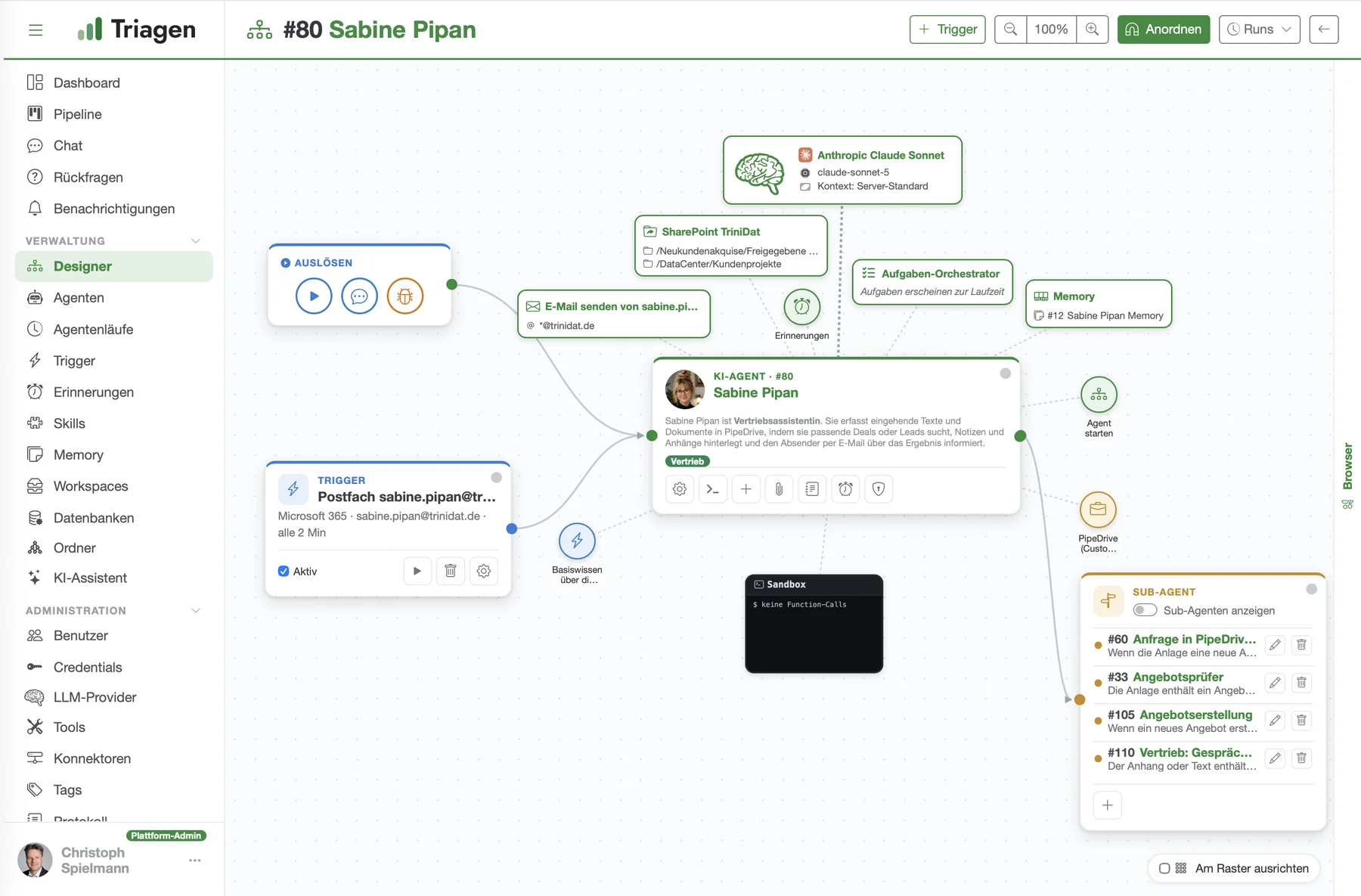
By email, in the chat or fully automatically
Your employees send the agent an email or ask it a question in the chat, attaching a file if needed. The agent can also become active on its own: when a new email arrives, at set times or as soon as someone submits a form. At the end, a finished result lands on your desk, not another task.
- Ready to use immediately, no training needed
- If information is missing, the agent asks instead of guessing
- Queue and priorities: important things get done first
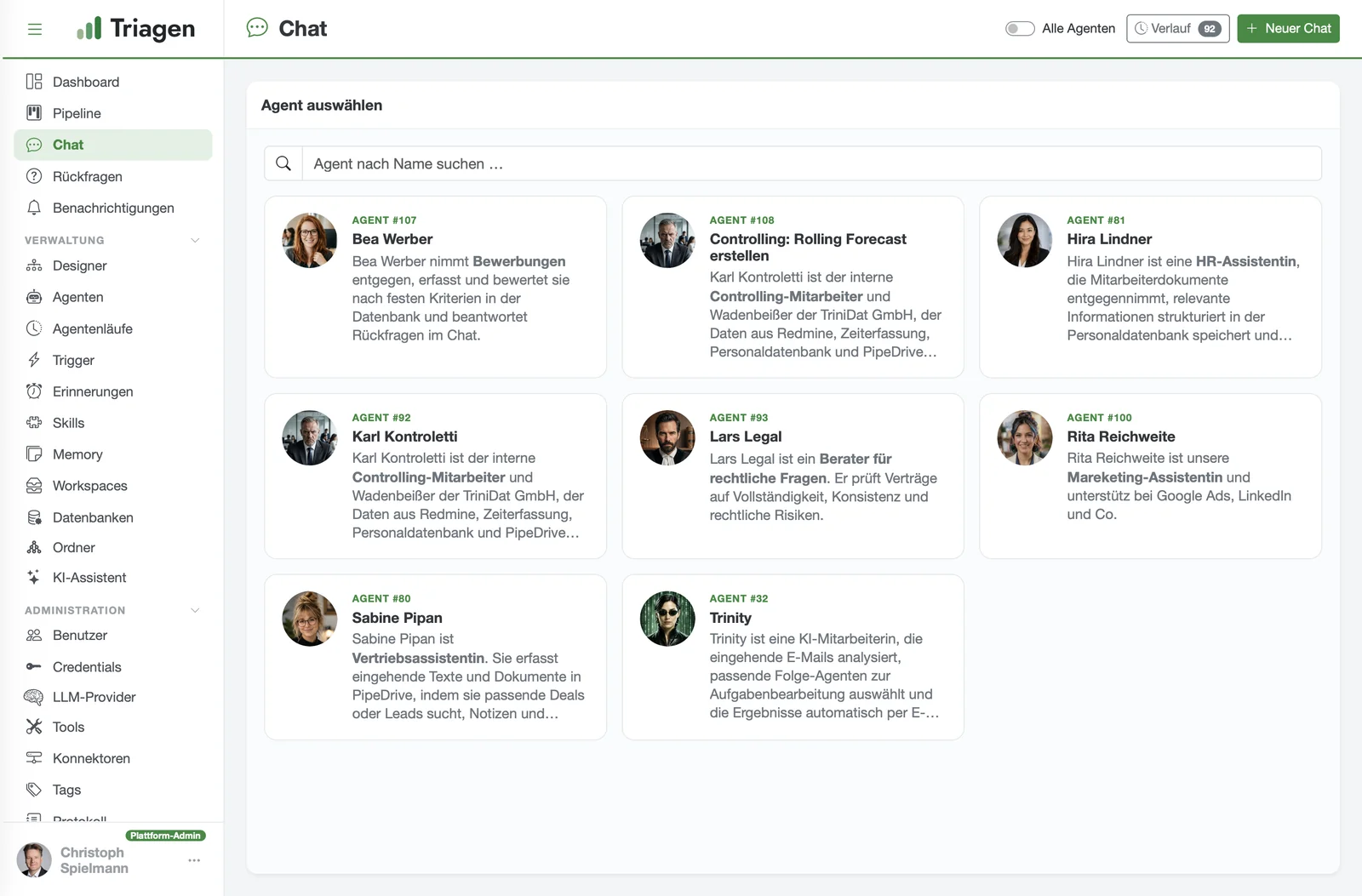
You see exactly what the agent has done
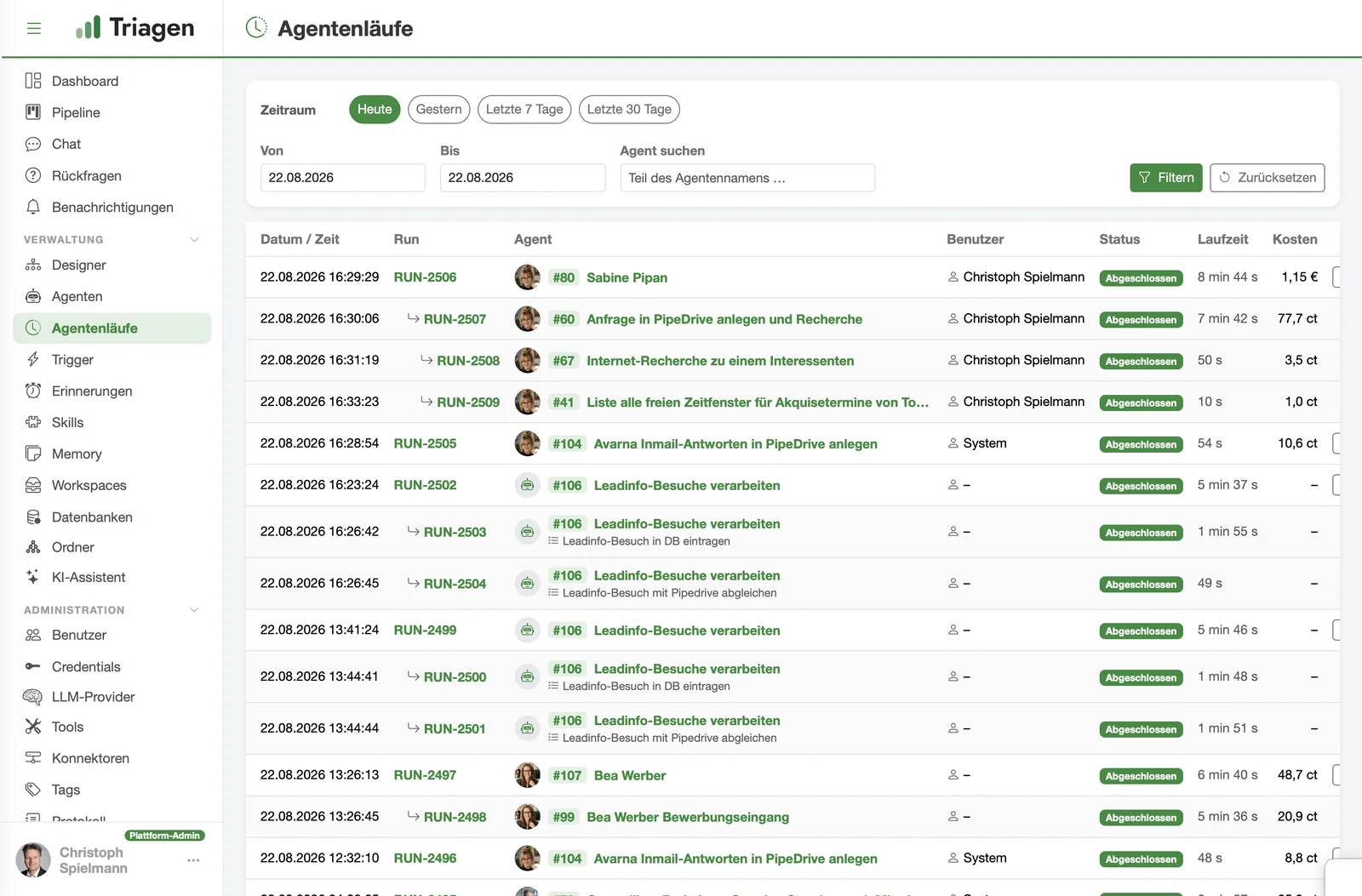
For every run, you can see in full which steps the agent took, exactly what costs were incurred and what the outcome was. The "Result" tab brings everything together in one place: sent emails including attachments, created files and the final answer. This keeps you in control of quality and costs at all times.
- Complete log, with costs in euros rather than abstract units
- Every sent email can be viewed: sender, recipients (including Cc/Bcc), subject and attachments
- Download created files directly
Your first agent in 5 minutes and 5 steps
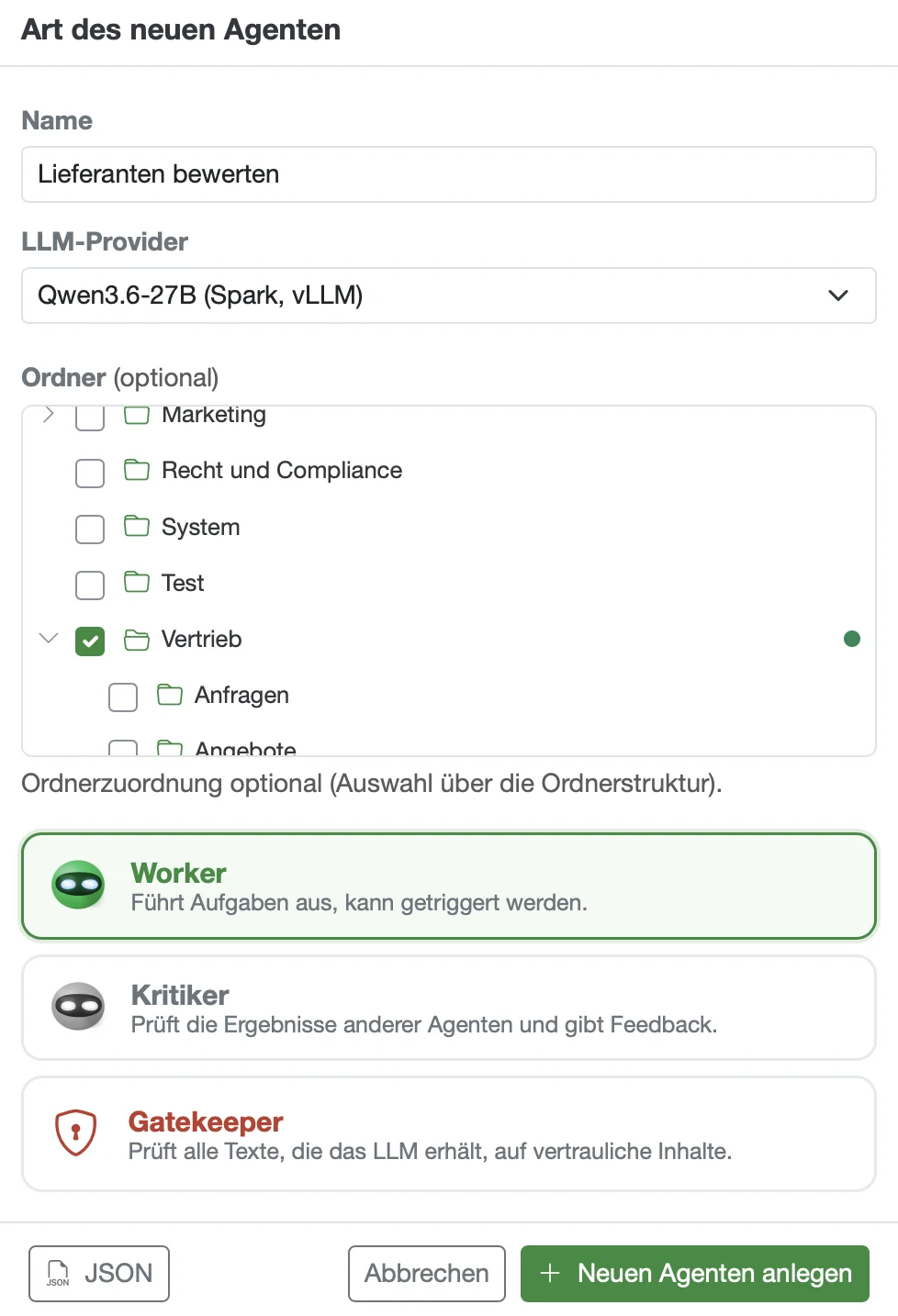
Give it a name, choose an AI model, local or cloud, and set the type. The framework for the new agent is in place.
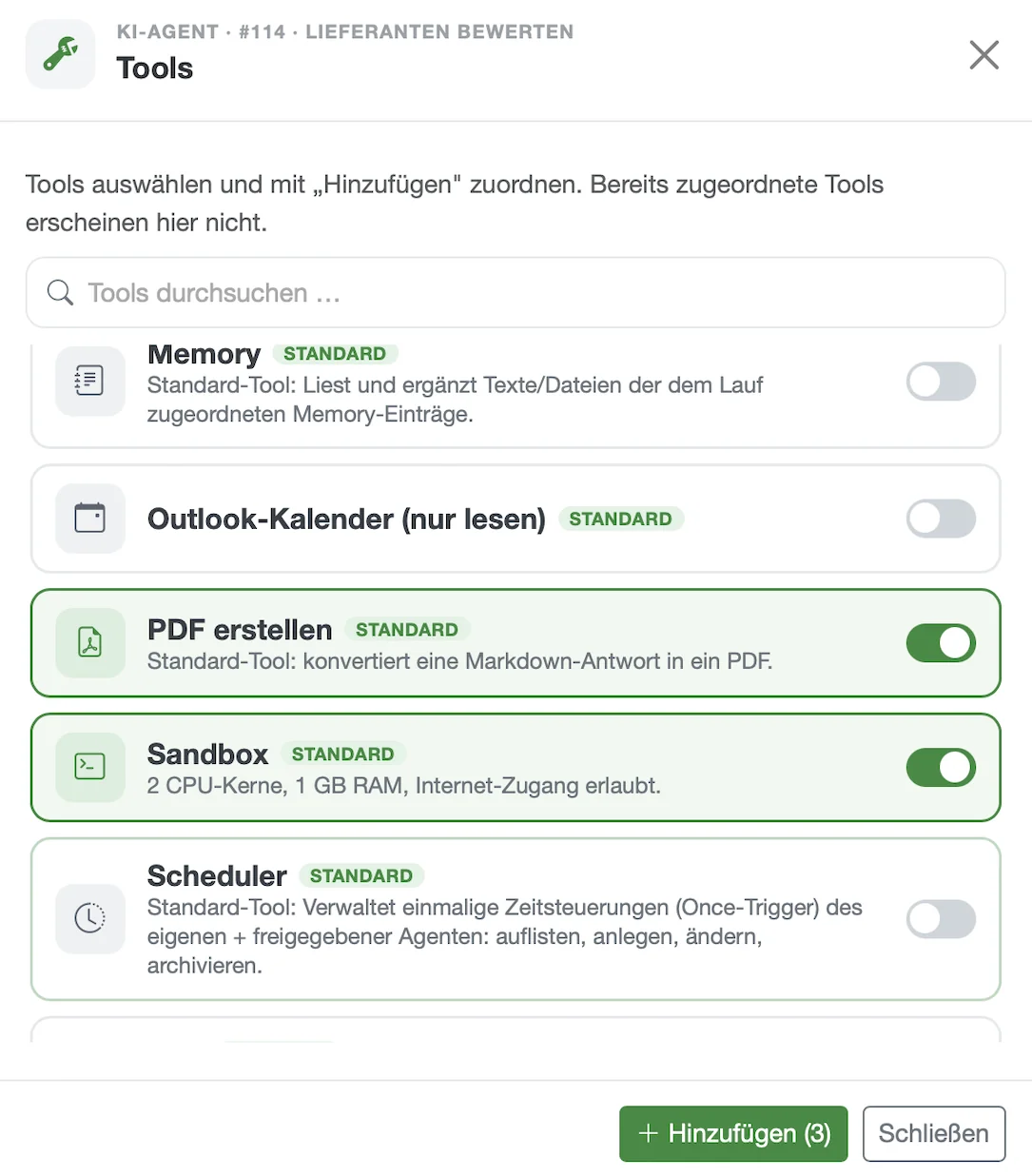
At the flick of a switch, the agent gets exactly the tools it needs, such as creating PDFs or the sandbox. No more and no less.
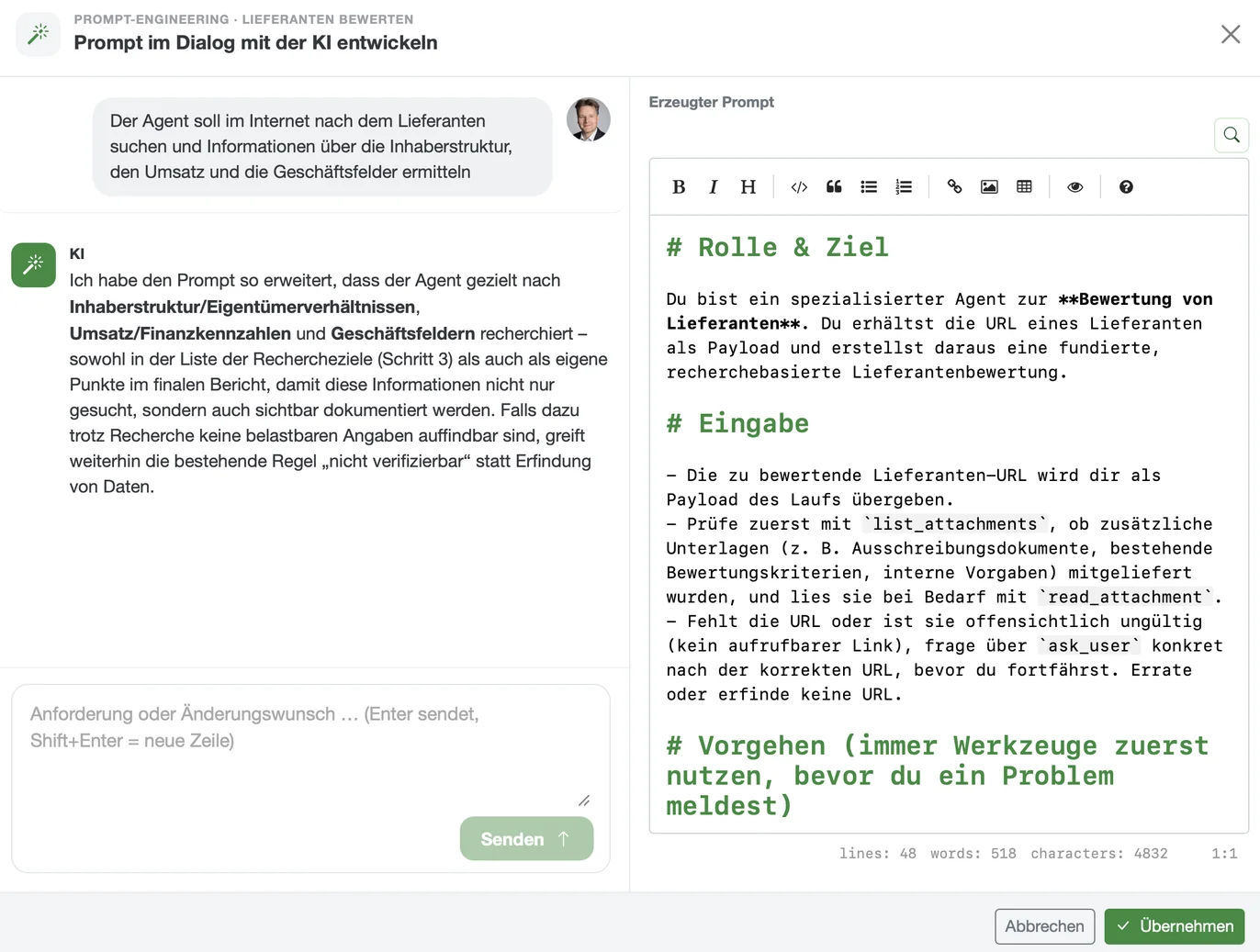
You describe in plain language what the agent should do. The AI assistant turns this into the finished assignment and refines it in dialogue with you.
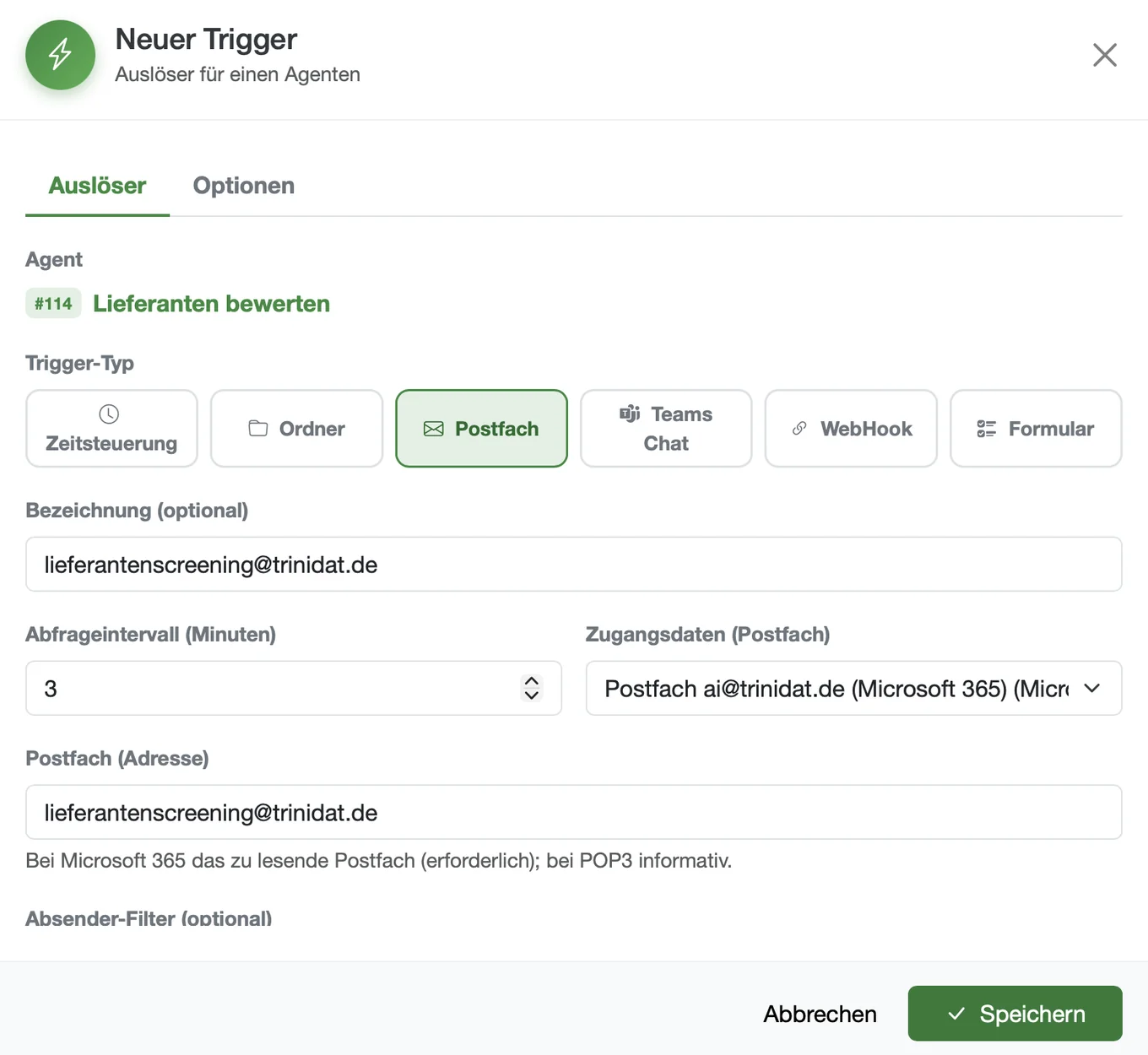
The agent starts on its own, for example when an email arrives in the mailbox, on a schedule, via a form or from other systems.
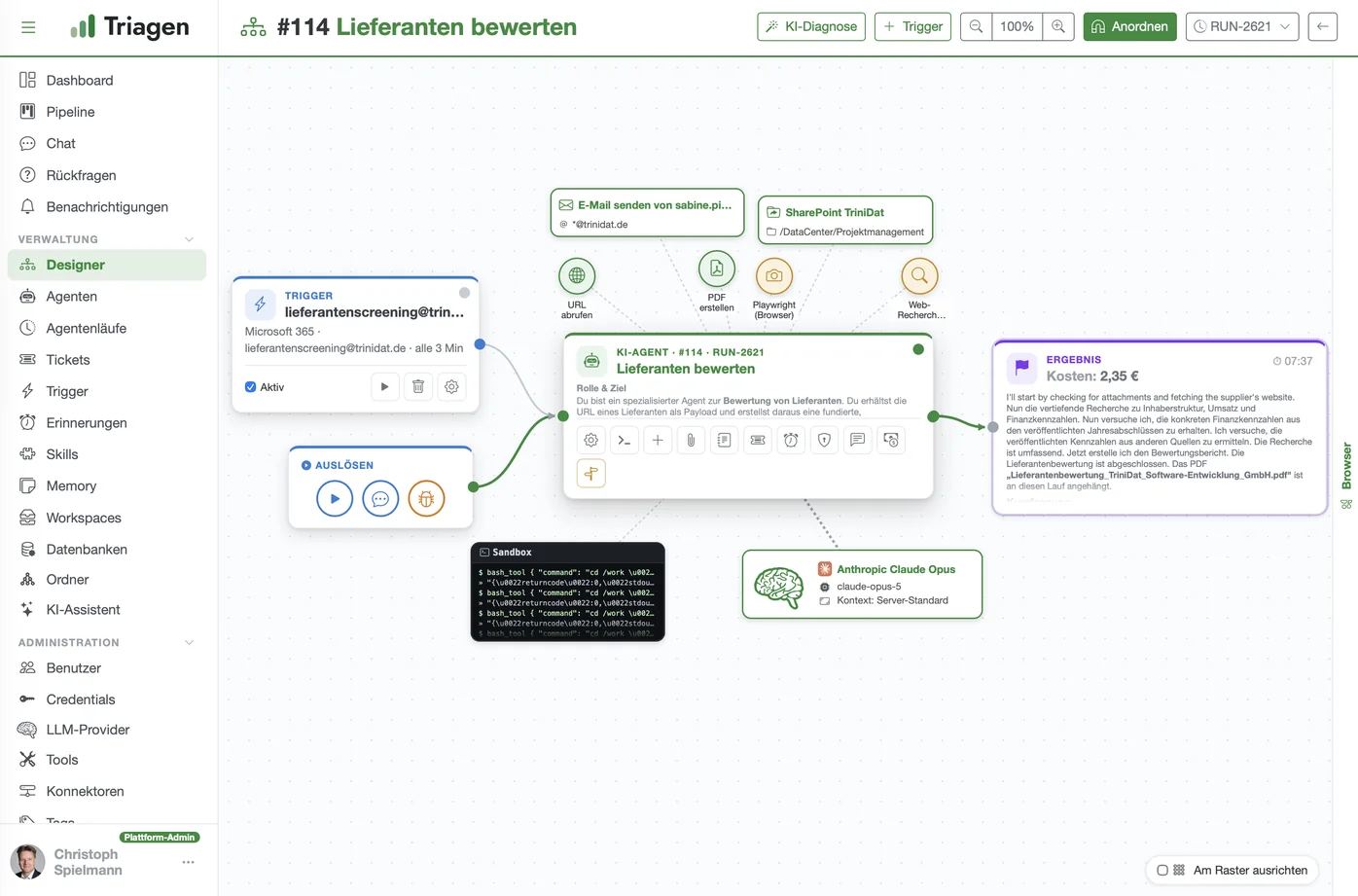
The agent researches, creates the result and saves it. Every run shows duration and costs down to the cent.
Whoever knows the task builds the agent
It's not the software that decides, it's your know-how: you describe your process and triagen turns it into an AI agent that takes over the task on its own.
Ready to connect
Over 5,000 freely available connectors based on the open MCP standard bring your systems together in days. If there is no suitable connector for a system, we develop it for you.
Your team builds it themselves
Whoever knows the process describes it in plain language and creates the agent themselves.
One system for many tasks
The same system handles enquiries, creates quotes, checks receipts and writes reports.
Everything stays with you
Bring your own key: you use your own access to the AI provider and pay the model costs directly there, with no mark-up from us. Everything runs on your servers, every run is logged and the costs per run are shown in euros.
This makes the specialist department the audience, not IT. And it pays off even for the many small processes for which a software project never made financial sense.
More than a chatbot. Smarter than a workflow.
- A chatbot talks. The work stays with you.
- A workflow tool follows a plan. At the first exception, it gets stuck.
- A triagen agent gets the task done. It is given a goal, tools and permissions, decides on the way forward itself and stays within the limits you set.
You describe the process in plain language, just as you would explain it to a new employee. The agent takes care of the rest. Every run is logged.
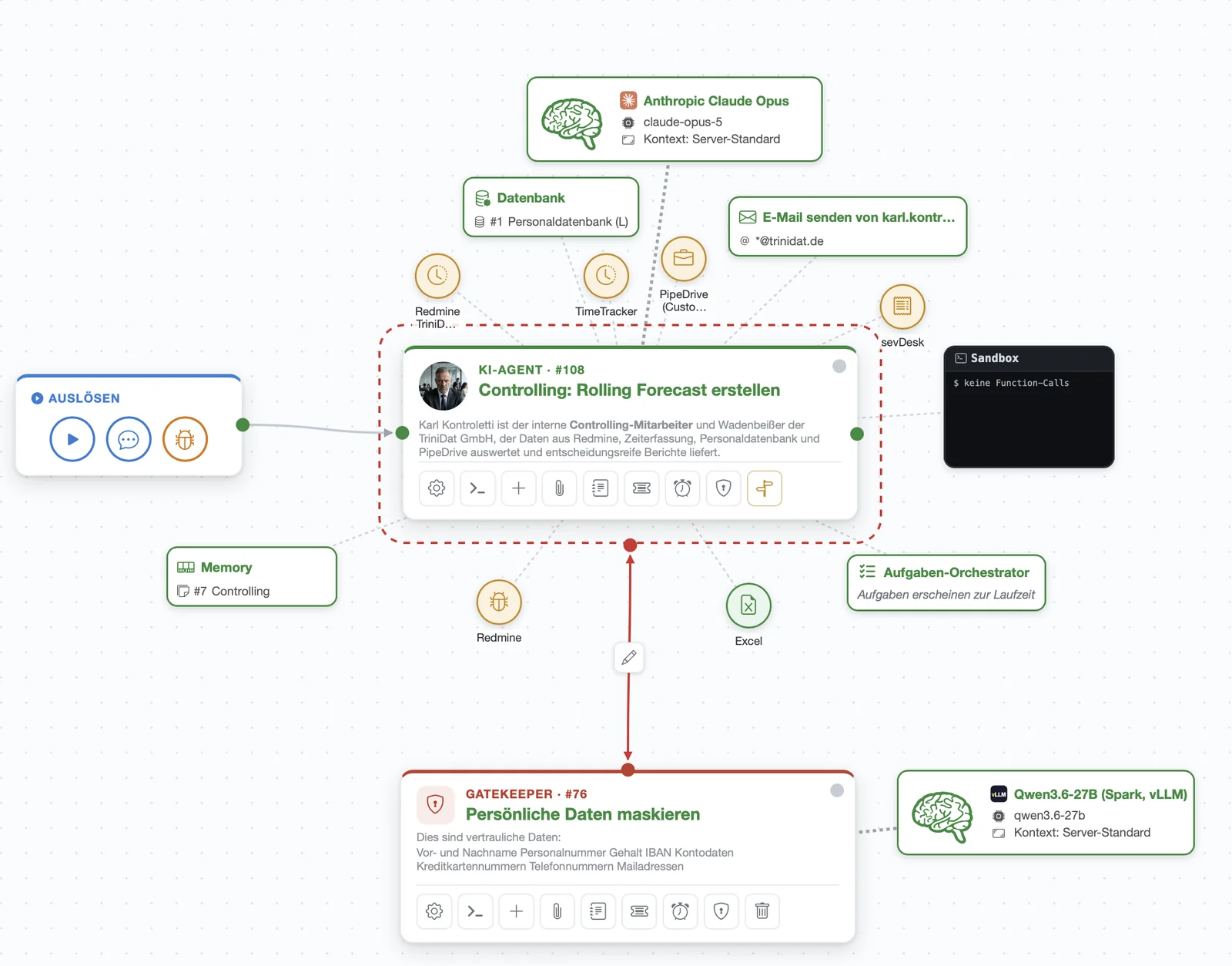
The Gatekeeper checks before anything reaches an AI model
- Critical and confidential company data is detected and redacted For example: recipes, prices, calculations, personnel data
- All data is checked, including your employees' input, the prompts and the interface data from your systems
What the Gatekeeper can do when it finds confidential data
For the GDPR, this means: triagen runs on your own servers and your confidential data never leaves the building, so there is no transfer to a third country and no data processor. You decide individually for each agent whether it uses a cloud model or a local AI. The Gatekeeper checks every handover and logs it in an audit-proof way. This is the basis for GDPR-compliant use.
Protected against faulty results and operating errors
- Four-eyes principle: a critic agent checks the result before it is output
- Protection against input errors: your employees' input is checked too. The Gatekeeper intercepts confidential data entered by mistake
- Humans decide: critical steps pause and wait for approval
- No black box: every run is traceable, every change can be rolled back
- Costs under control: hard limits per agent, consumption in euros
How smart are triagen agents?
For an agent to really take work off your hands, it has to be able to do more than talk: it has to know your company, remember yesterday and know when to call in reinforcements.
Contextual knowledge from its own runs
- The agent records what it has learned during a run
- Next time, it finds it again – without anyone having to enter it
- On request, it can also read other agents' knowledge
Memory as a shared knowledge base
- A knowledge store shared by several agents
- Maintained once, used by all
- Folders and permissions determine who can see inside
RAG with its own vector database
- All data is stored as vectors in a vector database
- The agent finds content that matches in meaning rather than literal hits
- It answers based on your content, not on gut feeling
Its own databases that grow with it
- The agent creates tables itself and extends the schema
- It collects data across runs and analyses it
- Every structure is documented and can be viewed
Agent crews for big tasks
- An assignment is broken down into subtasks automatically
- Several agents work on it at the same time
- The results are brought back together
Delegation to sub-agents
- Specialists take on what they do best
- The delegating agent waits for the result and continues working with it
- Limits on depth and number prevent things from getting out of hand
Internet research
- Up-to-date knowledge from outside instead of outdated model knowledge
- Web pages are read and boiled down to the essentials
- Sources remain traceable within the run
Sandbox: the agent does its own calculations
- The agent writes small programs (Python, Node.js) and runs them
- This lets the agent calculate precisely, convert files and analyse data – something a language model cannot do on its own
- Everything runs in an isolated container that disappears without a trace after the run
What decision-makers ask us first
Does our data leave the company?+
Isn't this the same as n8n, Power Automate or Zapier?+
Can we run triagen completely offline?+
Does it also work without Microsoft 365, i.e. with our own Exchange and NAS?+
What hardware do we need?+
Who creates the agents, and does it require programming skills?+
What happens if an agent delivers a wrong result?+
What does triagen cost, and what are the running costs?+
Do we need a data processing agreement with trinidat?+
What happens if we want to switch triagen off again?+
Others sell you implementation. We make you independent.
With triagen, your specialist departments build their own AI agents for your processes. If you prefer, we take care of the building. The choice is yours.
Nobody needs programming skills for this. Your team describes its process in plain language. We build the first agent together with you.
- Your process know-how stays in-house. No external service provider needs to analyse or see your processes.
- Changes in hours instead of weeks. Your team adapts its agents itself, without quotes, tickets or waiting times.
- Predictable costs instead of consultant days. No follow-up costs for every adjustment, no high set-up costs.
- Start small, see the benefits immediately. You begin with a single process instead of an implementation project lasting months.
- No dependency on a service provider. You remain able to act, even if priorities or partners change.

TRInidat + AGENt platform = TRIAGEN
triagen is backed by an established software company. trinidat has been developing custom software for SMEs since 1997 and today employs around 50 developers in Düsseldorf. Business processes are our day-to-day business, in industry, trade and administration. You can find our references at www.trinidat.de/referenzen
Start small and grow. You decide.
Runs on your servers, model costs paid directly to the AI provider.
triagen Basic
To get started: put individual agents into production without platform overhead.
- Users and agents5 users · 20 agents
- Gatekeeper as data protection guardiannot included
triagen Pro
For ongoing operation across departments and the company.
- Users and agents10 users · 50 agents
- Gatekeeper as data protection guardianincluded, checks every handover to an AI model
triagen Enterprise
For company-wide operation.
- Users and agentsunlimited
- Gatekeeper as data protection guardianincluded, checks every handover to an AI model
Additional users and agents are billed on a fair sliding scale. The average price falls with every expansion step. Prices for triagen Enterprise are tailored to your company.
Feature matrix: what's included in which edition?70 features compared
| Feature | Basic | Pro | Enterprise |
|---|---|---|---|
| Building and running agents | |||
| Create and run agentsCreate your own AI agents with a system prompt, model and tools and put them into production. | ✔ | ✔ | ✔ |
| Graphical workflow designerThe agent with its tools, connectors, critics and sub-agents as a diagram – edit with a click. | ✔ | ✔ | ✔ |
| AI assistant in the designerThe assistant builds the agent in conversation: prompt, tools and triggers are created in dialogue. | – | ✔ | ✔ |
| Prompt engineering dialogueDevelop and revise the prompt together with the AI, with knowledge of the most recent runs. | – | ✔ | ✔ |
| Skills (prompt building blocks)Reusable text blocks with attachments, inserted before or after the prompt. | ✔ | ✔ | ✔ |
| Agent attachmentsFile templates attached to the agent that it can access in every run. | ✔ | ✔ | ✔ |
| Agent foldersTree structure for organisation; folders also control visibility and permissions. | ✔ | ✔ | ✔ |
| Configuration historyEvery change to the agent is versioned and can be restored. | ✔ | ✔ | ✔ |
| Archive instead of deleteAgents are decommissioned without losing their history and runs. | ✔ | ✔ | ✔ |
| Export and import (JSON)Transfer agents between instances, including tools and skills. | ✔ | ✔ | ✔ |
| Self-optimisationThe agent improves its own prompt over a limited number of runs. | – | – | ✔ |
| Dashboard and pipelineKanban view of runs and tasks, optionally available as a tool for agents. | ✔ | ✔ | ✔ |
| Agent collaboration | |||
| Sub-agentsAn agent starts other agents and waits for their result – sequentially or in parallel. | – | ✔ | ✔ |
| Dynamic orchestrationThe task orchestrator breaks down an assignment on its own and delegates the sub-steps. | – | – | ✔ |
| Critic agentsA second agent checks the result and sends it back for revision (reflection loop). | – | ✔ | ✔ |
| GatekeeperGuardian before every handover to an AI model: checks, anonymises or stops confidential content. | – | ✔ | ✔ |
| Decisions and follow-up agentsBranches in the process: the agent chooses an option and the matching follow-up agent takes over. | ✔ | ✔ | ✔ |
| Agents managing agentsAn agent creates agents, changes prompts and manages triggers. | ✔ | ✔ | ✔ |
| Run chain visualisationWho started whom: the entire tree of a run at a glance. | ✔ | ✔ | ✔ |
| Knowledge and data | |||
| Memory (knowledge store)Shared knowledge stores that several agents can read and write. | ✔ | ✔ | ✔ |
| Semantic search in memoryVector search finds content that matches in meaning, not just literal hits. | – | ✔ | ✔ |
| Vector database (RAG)All data is stored as vectors in a vector database; the agent finds content that matches in meaning and uses it as the basis for its answer (retrieval augmented generation). | – | – | ✔ |
| Databases (SQLite)Each agent's own databases, read and write, with schema documentation. | – | ✔ | ✔ |
| WorkspacesDefined file storage locations (local or SharePoint) that agents are allowed to access. | – | – | ✔ |
| SharePoint accessRead and store documents in SharePoint, limited to approved paths. | – | ✔ | ✔ |
| Context compressionLong runs stay affordable: the agent summarises its own context. | – | – | ✔ |
| Prompt cachingRecurring parts of the prompt are cached, reducing costs. | ✔ | ✔ | ✔ |
| Triggers | |||
| Time and interval schedulingAgents run on a schedule: daily, weekly or at intervals. | ✔ | ✔ | ✔ |
| Folder monitoringA new file in the folder starts the agent. | – | ✔ | ✔ |
| Mailbox monitoringIncoming emails start the agent, with sender filter and user assignment. | ✔ | ✔ | ✔ |
| Form triggerYour own web forms start runs – also publicly via a link. | – | – | ✔ |
| Microsoft Teams chat startA Teams chat starts the agent and receives the answer back. | – | – | ✔ |
| WebhookThird-party systems start runs via a call. | – | ✔ | ✔ |
| Trigger calendarAll schedules shown as a calendar, with a day view. | – | ✔ | ✔ |
| Scheduler (agent plans itself)The agent creates one-off schedules for itself or others. | – | ✔ | ✔ |
| RemindersFollow-ups that prompt an agent again at the right time. | – | ✔ | ✔ |
| Humans and agents | |||
| Chat with agentsDialogue page for day-to-day work with an agent. | ✔ | ✔ | ✔ |
| Queries (human in the loop)The agent pauses and asks a human; the run waits for the answer. | – | ✔ | ✔ |
| Query inboxAll open queries in one place, with urgency, deadline and escalation. | – | ✔ | ✔ |
| Queries to groupsOne query to several people or a user group at once. | – | – | ✔ |
| NotificationsAgents actively inform people, in the application and by email. | ✔ | ✔ | ✔ |
| TicketsRecord and work through errors, tasks and suggestions on the agent. | – | – | ✔ |
| Tools | |||
| Send emailAgents send emails via defined senders and recipient rules. | ✔ | ✔ | ✔ |
| Word, Excel, PDFCreate and read documents – reports, spreadsheets, quotes. | ✔ | ✔ | ✔ |
| ZIP and vCardPack and unpack archives, read contact details. | – | ✔ | ✔ |
| Fetch web pageRobustly extract the content of a page and process it further. | ✔ | ✔ | ✔ |
| Web researchSearching the web as a basis for answers. | ✔ | ✔ | ✔ |
| TranscriptionConvert voice recordings into text (Whisper, also locally). | – | – | ✔ |
| Outlook calendarRead appointments, limited to shared calendars. | – | ✔ | ✔ |
| SandboxPython and Node.js in an isolated container – including Office and PDF tools. | – | ✔ | ✔ |
| SSH accessCommands and files on a defined machine. | – | – | ✔ |
| Models and connectivity | |||
| Multiple AI providersRun Anthropic, OpenAI, Google and others in parallel. | ✔ | ✔ | ✔ |
| Local modelsRun on your own hardware (Ollama, vLLM) – data never leaves the building. | – | ✔ | ✔ |
| Model choice per agentSet the model, temperature and extended thinking for each agent. | ✔ | ✔ | ✔ |
| MCP connectorsConnect third-party systems via the open MCP standard (e.g. CRM, ticket system). | ✔ | ✔ | ✔ |
| triagen as an MCP serverOther AI tools access triagen. | – | – | ✔ |
| Integration APIThird-party systems start runs and retrieve results via a secure interface. | – | – | ✔ |
| API tokensIssue and revoke access per user. | – | – | ✔ |
| Security, control and operation | |||
| Roles and permissionsUsers, managers and administrators with graded permissions. | ✔ | ✔ | ✔ |
| Tags and visibilityWho sees which agents and resources is controlled via tags and folders. | ✔ | ✔ | ✔ |
| Central credentialsKeys and passwords in one place, encrypted, never visible in plain text. | ✔ | ✔ | ✔ |
| Two-factor authenticationTOTP with recovery keys, managed by the administrator. | ✔ | ✔ | ✔ |
| Password policy and account lockoutComplexity, expiry and lockout after failed attempts. | ✔ | ✔ | ✔ |
| Event logWho changed what and when – traceable and analysable. | ✔ | ✔ | ✔ |
| Security overview per agentAt a glance: which data, tools and recipients can this agent reach? | – | ✔ | ✔ |
| ReportsAnalyses of runs, costs and usage. | ✔ | ✔ | ✔ |
| Cost and runtime limitsLimits per agent: costs, concurrent runs, tasks, delegation depth. | ✔ | ✔ | ✔ |
| Queue with prioritiesRuns are processed in order, important ones first. | ✔ | ✔ | ✔ |
| Maintenance modeUpdates without interruption: new runs wait, running ones finish normally. | ✔ | ✔ | ✔ |
| Bilingual interfaceGerman and English, selectable per user. | ✔ | ✔ | ✔ |
On request, we put together individual packages.
Which task would you like to automate first?

Tobias Geisler
Benrather Str. 7, 40213 Düsseldorf, Germany
Your process. Your agent. Live.
Tell us about a process from your day-to-day work. We will turn it into an agent and show you triagen using your own example. Free of charge and without obligation.
Arrange an initial meeting